Getting Technical – June 2026
June brought a range of new technical resources from Esri Canada, and we’ve gathered the most valuable ones here for you. In this month’s edition of Getting Technical, you’ll learn about ArcGIS Managed Cloud Services, an introduction to ArcGIS Workflow Manager, true curve editing in the ArcGIS Web Editor and many more technical topics.
Must Reads
Did you hear the news?
ArcGIS Pro 3.7 is here, and with that, you can take advantage of the new telecom domain network. It’s designed specifically for telecommunications infrastructure and large-scale fiber network management. The telecom domain network introduces a circuit-based approach that enables utilities and telecom providers to better manage services, understand dependencies and support modern network requirements. Explore the benefits such as grouping non-spatial features in the network data and telecom-specific traces and connect with Sergio Palladini, Industry Manager, Telecommunications, to assess your readiness and define a practical path forward.
The Esri UC Watch Parties
The Esri UC is approaching and we’re hosting watch parties across the country. If you want to experience the plenary live from the comfort of your own city, connect with your peers and enjoy delicious snacks, don’t forget to secure your spot. The Plenary will be live translated into French for the Montréal, Québec City and Ottawa locations.
Blogs
Is ArcGIS Managed Cloud Services the right fit for you?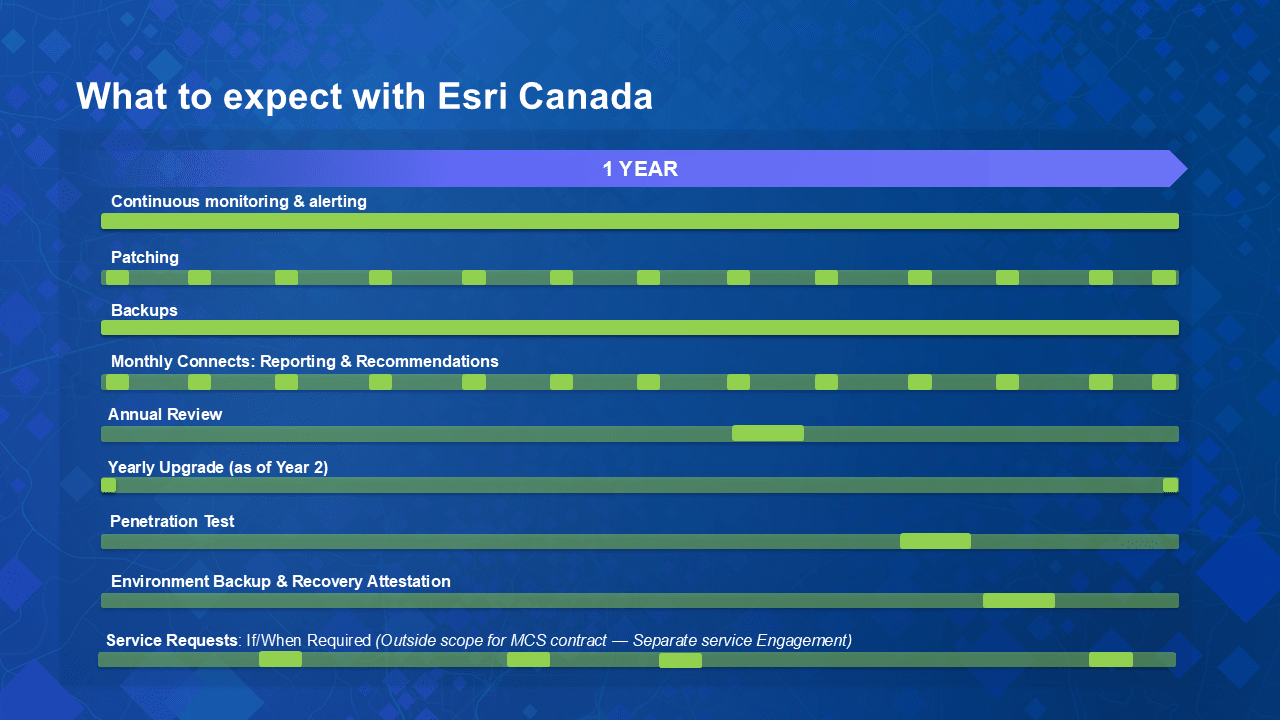
A snapshot of a typical year with Esri Canada ArcGIS Managed Cloud Services.
Following Esri Canada’s new ArcGIS Managed Cloud Services launch, this blog answers some of the key questions you have regarding Canadian data residency, setup, security and how we keep your environment updated and monitored so your team can focus on delivering results.
An introduction to ArcGIS Workflow Manager: managing GIS workflows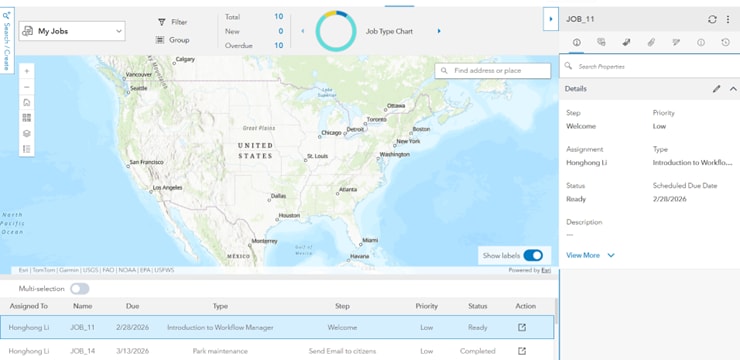
Workflow Manager interface showing job tracking and map-based workflow context
Understanding GIS work means understanding the processes behind it. In this blog, you’ll learn what ArcGIS Workflow Manager is, why structured workflows matter for GIS teams and how it helps organize tasks, guide users and track progress across your organization, bringing clarity and consistency to everyday GIS operations.
Creating inclusive stories with ArcGIS StoryMaps: a practical guide
What if your ArcGIS StoryMap story could reach people that you didn’t even realize you were leaving out? Inclusive stories remove barriers, amplify diverse voices and make information more meaningful. In this post, we explore key considerations and tips to design StoryMaps stories that are accessible, welcoming, and truly representative of the audiences we serve.
ArcGIS Hub: configurable catalogs crash course
ArcGIS Hub Catalogs just got a huge upgrade. Say hello to configurable catalogs, the latest way to organize and customize your catalog content. With flexible filtering and custom collections, it’s now easier than ever for users to search and discover content.
View all additional blog posts on the Esri Canada Resource Hub.
Videos
True curve editing in the ArcGIS Web Editor
In this GeoSnap, you'll discover how to create and modify smooth curves for more accurate and visually appealing GIS features. Watch now and improve your map editing workflow with true curve.
How to access Data Reviewer in ArcGIS Pro
Does your organization have a license for the Data Reviewer extension in ArcGIS Pro? In this GeoSnap, we teach you how to access the extension and activate the powerful capabilities to automate and simplify your data quality control.
How to make geofences in ArcGIS Field Maps
This video will show you how to set up a geofence in ArcGIS Field Maps to notify users when they enter or leave a data collection boundary.
Stay up to date on all our GeoSnaps by visiting the YouTube playlist.
Training
Get Started with CAD Data in ArcGIS
This course provides the practical knowledge and skills needed to start leveraging geographic information system (GIS) capabilities that enhance the value of computer-aided design (CAD) data, while infusing CAD data into GIS workflows that enhance field operations, analysis projects, infrastructure management and more. You will learn how integrated CAD–GIS workflows can help drive efficiencies and insights across your enterprise.
Esri Canada webinars & seminars
ArcGIS Online in Bloom: What’s New
July 30, 2026

The ArcGIS Online June 2026 update introduces exciting enhancements designed to improve how you manage data, build applications and understand how content is used across your organization. In this session we will demonstrate new functionality in Map Viewer, ArcGIS Dashboards and ArcGIS Data Pipelines. Join us to find out what’s new and where these updates can be implemented into your existing workflows.
Missed any of last month’s webinars? No problem! Check out the recordings: View recorded seminars | View recorded webinars

Service packs, patches & product support updates
Esri Support App
Download the Esri Support App to subscribe to important product updates and bug-related notifications.
Also, try its newest feature, which allows you to scan and solve error messages. You can also take advantage of Esri’s in-app generative AI chatbot to answer some of your questions. The Esri Support AI Chatbot can also be accessed on the Esri Support website.
ArcGIS Trust Center
Visit the ArcGIS Trust Center for critical security announcements and updates to privacy and compliance information.
ArcGIS Desktop to User Type Transition Administrator Action Guide

Retiring apps & features
Below you’ll find more information about the upcoming retirement of several apps and features included in ArcGIS Online and ArcGIS Enterprise:
- ArcGIS GeoEvent Server Will be Deprecated in Q2 2027.
- ArcGIS GeoEvent Server is being deprecated, and its final release is with the ArcGIS Enterprise 12.3 release, which is expected in Q2 2027. This deprecation is driven by the release of ArcGIS Velocity for ArcGIS Enterprise, which is the replacement product for ArcGIS GeoEvent Server.
- ArcGIS Workforce Will Retire in Q4 2026.
- ArcGIS Workforce, both the mobile and web applications, will be officially retired in the ArcGIS Online Q4 2026 update and in the ArcGIS Enterprise 12.2 Q4 2026 release.
- The functionality previously provided by ArcGIS Workforce is now available through the Tasks capability in ArcGIS Field Maps. Customers currently using ArcGIS Workforce or Workforce for ArcGIS must begin planning their transition to using the new Tasks capability in ArcGIS Field Maps to ensure continuity. For more information, read the deprecation notice.
- ArcGIS Web AppBuilder Will Retire in Q2 2027.
- ArcGIS Web AppBuilder in ArcGIS Online will be retired in the second quarter of 2027 with the following phases:
- Q1 2026—Creating new Web AppBuilder apps will no longer be possible.
- Q4 2026—Updating existing Web AppBuilder apps will no longer be possible.
- Q2 2027—Existing Web AppBuilder apps will be retired and will no longer function.
Apps will continue to work after retirement. However, we recommend you migrate your apps to ArcGIS Experience Builder as updates to browsers could introduce functional or security issues which will not be addressed by Esri. For more information, read the retirement announcement.