From “data about data” to AI fuel: ArcGIS Online Field Metadata Updater
Metadata is the backbone of data sharing, community trust and AI readiness. In our previous blog, From “data about data” to AI fuel: metadata powers ArcGIS intelligence, we explored how metadata has evolved from simple documentation into a critical component of modern ArcGIS platform. In this post, we move one step further and give a practical solution to create and manage high-quality metadata, focusing on attribute field information for feature services.
Why attribute field metadata matters
One of the most important components of metadata in ArcGIS Online is attribute field information. Attribute fields describe the structure and meaning of the data within a layer. Providing clear field display names, concise descriptions and defined value types helps users quickly understand what each field represents. This information allows users to determine whether the dataset meets their needs and helps them apply styles or perform analysis correctly.
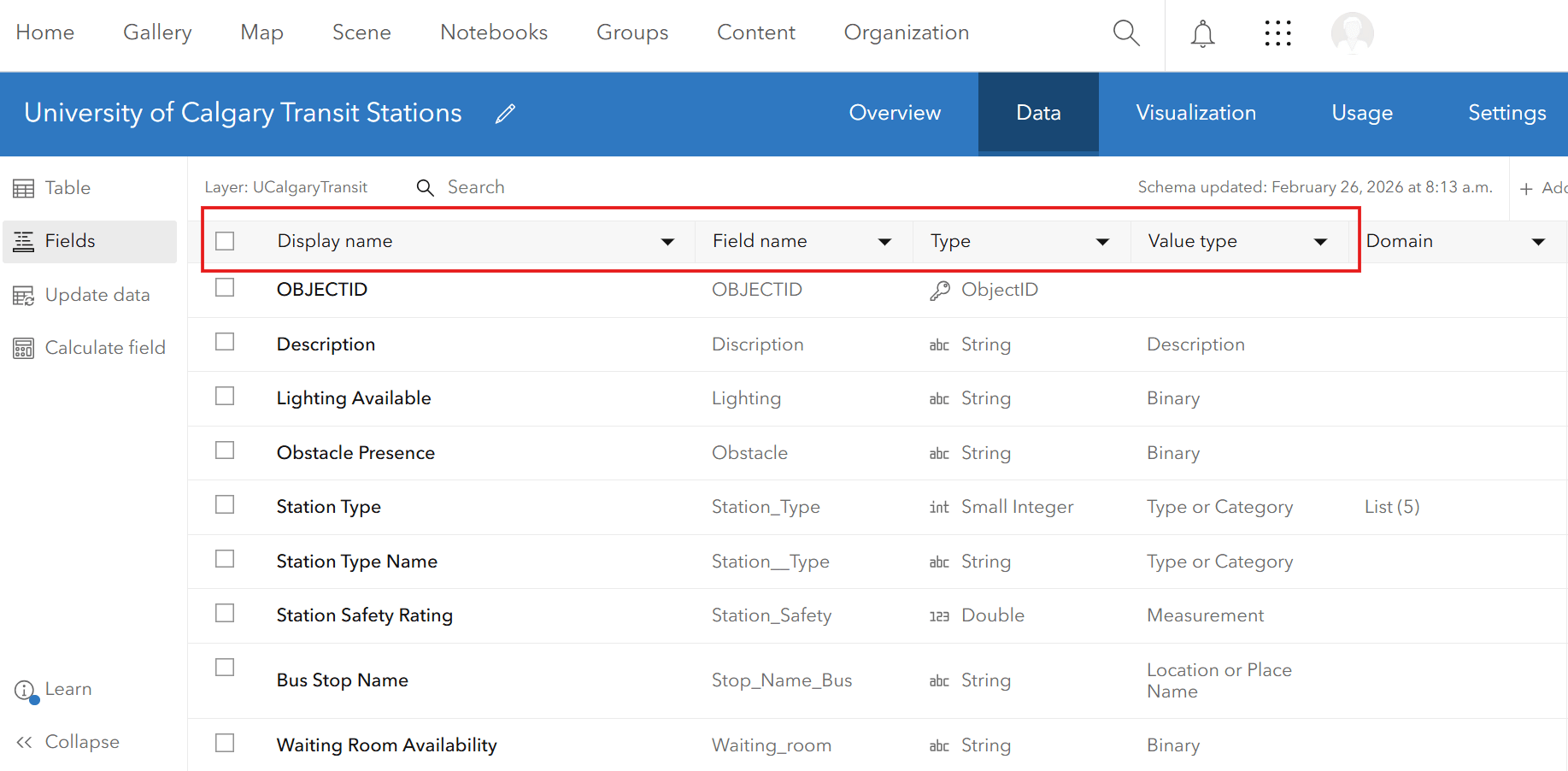
ArcGIS Online feature layer attribute field
Attribute field metadata is becoming even more important as the ArcGIS ecosystem moves toward agentic AI. At the Esri Developer Summit 2026, it was announced that “ArcGIS is becoming agentic”, supporting AI agents that can assist completing complex GIS tasks autonomously. AI agents rely heavily on metadata to understand datasets and determine how they can be reached and used. That’s why when attribute fields are well documented, ArcGIS AI assistants and agents can better interpret what the data represents, making it easier to search, discover and apply datasets in automated workflows.
Making metadata easier to maintain
Despite its importance, maintaining attribute field metadata should not become a burden for organizations. Esri is continuously introducing capabilities to make this easier. For example, the June 2025 update of ArcGIS Online enhanced the ability to synchronize attribute field information, helping maintain consistency between datasets and services. More recently, the February 2026 update introduced the Item Details Assistant (beta), an AI-powered tool that helps users create and improve item metadata. The assistant analyzes a dataset and generates suggestions for titles, descriptions, tags as well as layer’s attribute field information including display names (aliases), descriptions and value types.

ArcGIS Online feature layer attribute field
While the Item Details Assistant can be very helpful at generating new field metadata, there are situations where organizations may already have access to their own metadata in another format (i.e., text and csv) that just needs to be pushed to their service on ArcGIS Online. For organizations that manage hundreds of layers or feature services containing numerous fields, their metadata often needs to follow organizational standards and remain consistent across datasets. As a result, field aliases, descriptions and value types may need to be applied uniformly across many layers. To help address this challenge, we have designed a workflow to scale metadata management while keeping humans in control of the content validation.
ArcGIS Online Field Metadata Updater
The ArcGIS Online Field Metadata Updater is a code-based automated workflow that pushes user-generated field metadata from a lookup table to an ArcGIS Online feature service. It was originally created to help existing feature services meet the new field metadata requirement for the Living Atlas, but it can generally be used to improve usability for any feature service.
Learn how to use this tool in 3 simple steps:
Step 1: Download the AGOL_FieldMetadataUpdater_FH.py script from the ArcGIS Online Field Metadata Updater. Next, define all the parameters in Part 3 of the script, including the item ID of the feature service you are trying to update. Run the script to export the existing field metadata (aliases, descriptions and value types) into an Excel lookup table saved in the specified folder.

The result of completing step 1
Step 2: Edit and review the Excel lookup table.

The result of completing step 2
Step 3: Push the changes to the service on ArcGIS Online.

The result of completing step 3
Using the Field Metadata Updater and Item Details assistant together
When designing metadata workflows, it is useful to distinguish between the roles of the Item Details Assistant and the ArcGIS Online Field Metadata Updater. Although both support field-level metadata improvements, they are designed for different use cases. The diagram below summarizes the key differences between the two tools, including when each is most appropriate and how they support different metadata workflows.
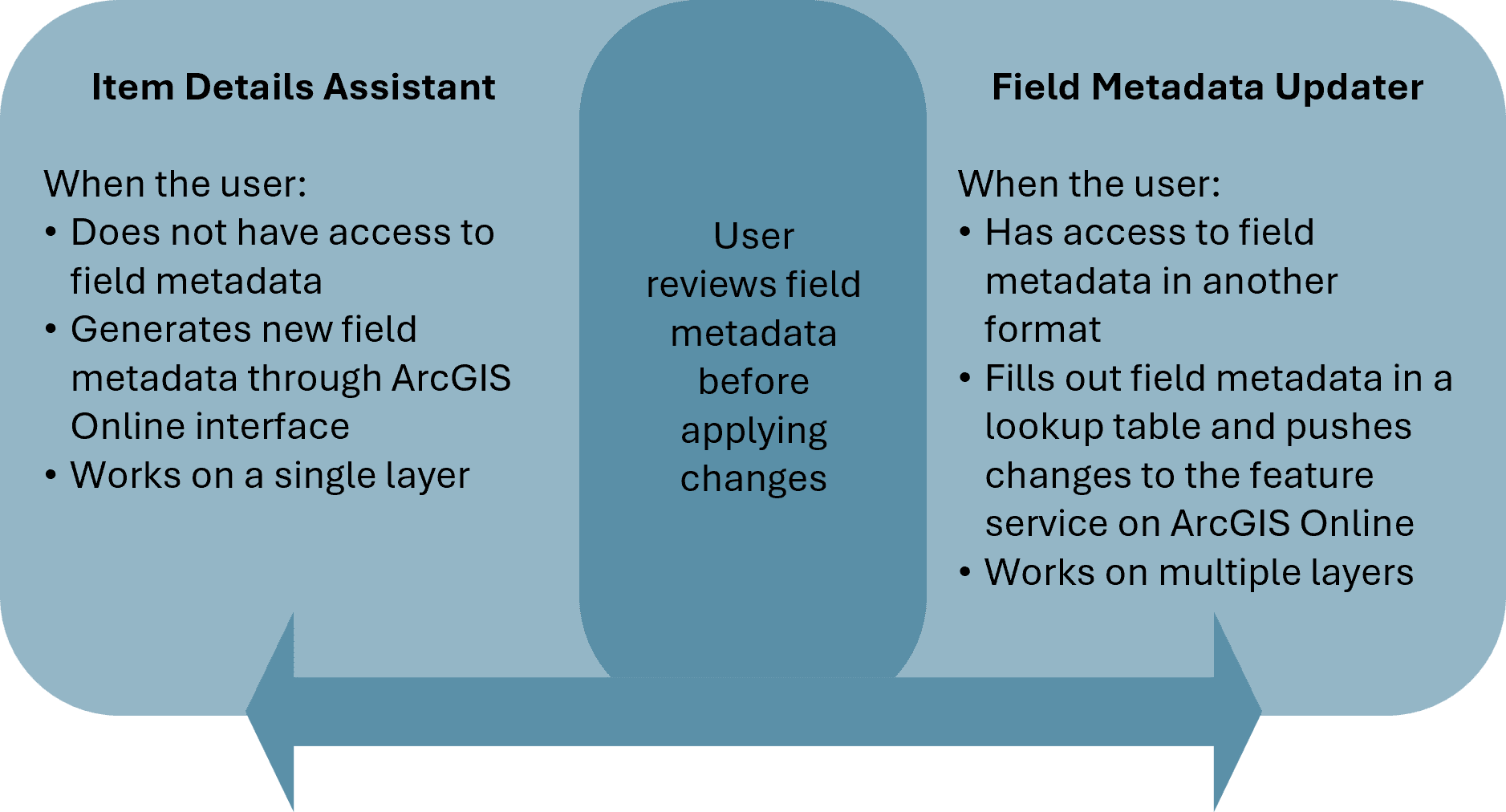 Comparison of the Item Details Assistant and ArcGIS Online Field Metadata Updater
Although the two approaches serve different purposes, they can work together effectively. In many cases, users may need a combination of strategies, for example, manually completing metadata for some fields while generating or refining metadata for others. In both workflows, the common principle is that the user reviews and approves field metadata before any changes are applied, ensuring accuracy, consistency and alignment with organizational standards.
With the right tools and workflows in place, metadata becomes not just documentation, but a foundation for reusable, AI-ready GIS. Continue your metadata journey with the supporting resources below:
- Metadata Year in Review for 2025
- From “data about data” to AI fuel: metadata powers ArcGIS intelligence
- Introducing the Item Details assistant (beta)
- Sync Attribute Fields Using the Metadata Editor
- Living Atlas “Evaluate and Nominate” App Released
- Overwrite Your Metadata with Ease