From static to dynamic: Transforming official plans with ArcGIS StoryMaps
Learn how the City of Grand Forks leveraged ArcGIS StoryMaps when updating their Official Community Plan to become an online resource.
Recently, the Community Planning team at Esri Canada worked with the City of Grand Forks, British Columbia, in developing an ArcGIS StoryMaps collection application that presents a digital version of their Official Community Plan. Originally adopted by Council in 2022, this new consolidation provides users with a more convenient online experience for 2026 and beyond.
Why digital planning matters
Compared to years ago, many planning departments are facing growing expectations for digital-first public engagement methods. Community members are expecting planning information to be accessible online, mobile-friendly and visually intuitive. Paper plans, often displayed on the web as large documents in PDF, cannot meet these expectations on their own.
ArcGIS StoryMaps is a product that allows users to transform these paper plans into a more immersive, dynamic experience that feels better suited to today’s digital devices. The ability to present longform text alongside a variety of 2D maps, 3D scenes, multimedia and other embedded content makes it an ideal candidate for updating planning documents like an official community plan for a municipality.

ArcGIS StoryMaps are legible and accessible on any screen size
In addition to the obvious on-screen presentation benefits, the creation of digital planning deliverables provides an increased sense of transparency and trust. Interactive maps and a clear narrative structure help demystify planning documents for less experienced readers that are often hundreds of pages long. Paper plans also get outdated quickly, whereas a product like ArcGIS StoryMaps allows for updates in real time as plan amendments or growth projections change, which can help accelerate update cycles.
Paper policy meets a new platform
A few months ago, the City of Grand Forks, British Columbia, was looking to update their Official Community Plan using ArcGIS StoryMaps. The existing version of the plan was a large PDF document totaling 149 pages, that contained eight section chapters, two appendixes and a schedule of 15 static maps. Adriana Cameron, planner with the Development and Planning section at the City, recounts making the decision to try a new platform like ArcGIS StoryMaps for what was traditionally a paper-only deliverable:
“We were drawn to ArcGIS StoryMaps because of its ability to combine narrative, mapping, and data visualization in a single, accessible format. The City needed a tool that could bridge the gap between technical planning information and how residents actually want to consume that information, and StoryMaps offered exactly that. Before this update, the OCP existed mainly as a lengthy, static PDF that was difficult for the public to navigate and even harder to keep current. StoryMaps, by contrast, integrates directly with our existing GIS system, which means staff can make updates quickly, accurately, and without special training or added costs. This efficiency allows us to keep the document truly ‘live,’ ensuring that maps, data, and policy details remain up to date.”
Adriana Cameron, planner, Development and Planning, City of Grand Forks
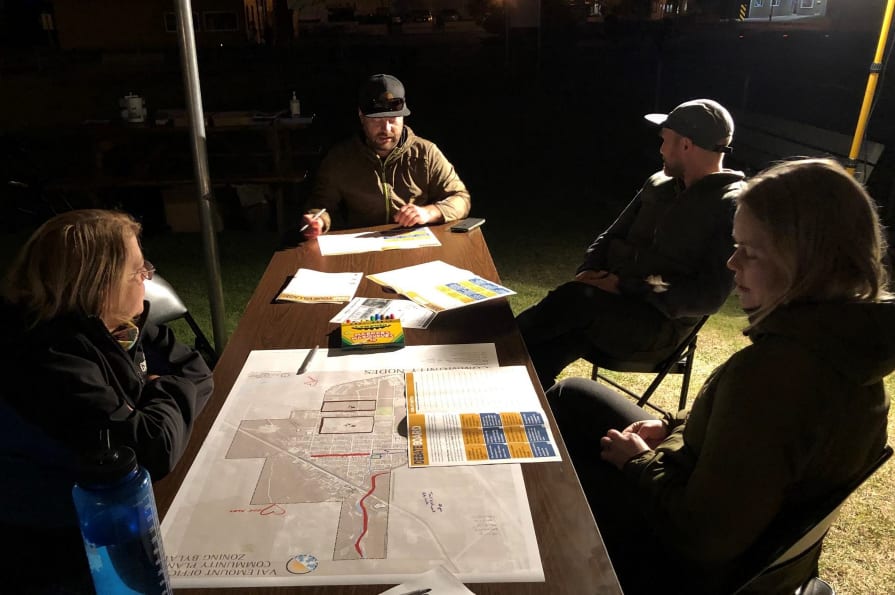
Early paper-based drafts of the Official Community Plan being used during its composition| Source: City of Grand Forks
ArcGIS StoryMaps excels at translating text-based chapters into more dynamic experiences that mirror official plan sections. The mix of text, multimedia and interactive maps helps simplify complex policy ideas. Highlighting spatial policy with interactive maps embedded directly in each section, instead of static schedule maps in PDF, can let users explore geographic context at their own pace.
Ensuring a repeatable process
The process of making the plan’s sections in ArcGIS StoryMaps was one that needed to be repeatable for City staff. A uniform look and feel, consisting of elements like section headers, separators and formatted text, needed to be maintained because each section of the plan was created as its own ArcGIS StoryMaps application.
To accomplish this, first, we created an ArcGIS StoryMaps theme based on the colours, fonts and branding used in the static version of the plan. Second, we created an ArcGIS StoryMaps template application that staff could use each time they began to create a section of the plan.
“Using a template for each StoryMap honestly made the whole process so much smoother. Esri Canada worked with us to set up templates that matched the layout of the Official Community Plan, and once those were ready, it was just a matter of bringing the content over. Since the OCP is a Council approved bylaw, accuracy is everything—we can’t afford errors. Having a consistent template helped keep everything aligned and reduced the chance of mistakes. It takes the pressure off the design side of things so you can focus on the part that really matters: the content.”
Adriana Cameron, planner, Development and Planning, City of Grand Forks
Improving understanding with interactive maps
Replacing each section’s static maps with interactive web maps was another key transformation that brought both technical and audience advantages. Users can zoom, pan and click on features to reveal policy-specific details – tasks just not possible on a printed page. Web maps can make complex zoning or land use policies easier to understand without forcing the user to dig through appendices. Additional benefits include supporting accessibility and inclusivity as interactive maps tend to be more accessible to non-experts, youth, newcomers and anyone unfamiliar with reading large-format planning maps.
Using an interactive map within the Official Community Plan
Leveraging ArcGIS StoryMaps collections for a responsive, multi-chapter presentation
One of the requirements we needed to fulfill was to have each section of the Official Community Plan presented together, like a paper plan, even though each section was composed as an individual application. Having multiple individual applications listed as hyperlinks on the City’s main website would work in theory but would be cumbersome to use when navigating between sections. ArcGIS StoryMaps collections allowed us to add each section, plus subsequent appendices, map schedules and even a PDF copy of the plan, into one cohesive application with the ability to navigate between sections without users having to leave the collection itself.
Exploring the Official Community Plan as an ArcGIS StoryMaps collection
ArcGIS StoryMaps are WCAG 2.2 AA compliant and made with responsive design to remain legible on any screen size without any custom coding. This enables planning departments to provide their organization’s communication teams with digital deliverables that will not only look good on their corporate website, but also in public consultation sessions or at a Council meeting, while adhering to web accessibility standards.
“Since we launched the StoryMap collection, it’s quickly become a go-to tool for staff when we’re working with the public. During remote meetings, we can screenshare the exact parts of the OCP that relate to someone’s project and walk them through the maps and policies in real time. It’s a much more effective way to show how everything fits together. Looking ahead, I can also see this being valuable for public consultations. Having an interactive, visual format makes complex planning information much easier for residents to engage with.”
Adriana Cameron, planner, Development and Planning, City of Grand Forks
Final reading of the Official Community Plan Bylaw No. 2089-A3 took place on January 12, 2026 at Regular Meeting and it was approved.
To learn more about services offered by Community Planning at Esri Canada, please explore our Planning & Housing industry page and join our Planning & Housing User Group on LinkedIn.