ArcGIS has GeoAI everywhere to support your science of where
Esri Canada’s National Training Team invites you to amazing instructor-led courses that teach you how to infuse your GIS projects with geospatial artificial intelligence, otherwise known as GeoAI.
AI is a hot topic in any industry these days, including those where geospatial (i.e., location) is of utmost importance. According to the The Future of Jobs Report 2025 by the World Economic Forum, employers are anticipated to re-orient their hiring practices (for new/evolving positions) and their overall business response to the big data and information processing transformations brought about by AI. With these innovations, routine data tasks are streamlined, predictive analysis becomes more robust and decision-making grows more effective, thus driving organizations to achieve greater success. Through leveraging AI tools, you can reveal patterns that were previously undetectable, forecast upcoming developments with remarkable precision and act confidently in real time.
You can easily add trusted AI in ArcGIS to your geospatial skills because there are three ways AI is in ArcGIS right now:
- AI assistants – Although not the subject of this blog post, it is worthwhile including this for completeness because tapping into generative AI to assist you in designing and automating workflows will boost your productivity. See the ArcGIS Online and ArcGIS Enterprise documentation for available AI assistants. (Note: Do not confuse this with the ArcGIS Assistant, which is a versatile tool for helping you manage content items across the ArcGIS platform.)
- Data extraction – Use pre-trained deep learning models for tasks such as extracting features from imagery.
- Spatial analysis – Integrate machine learning-based computational tools into geoprocessing for pattern recognition and predictive analysis.
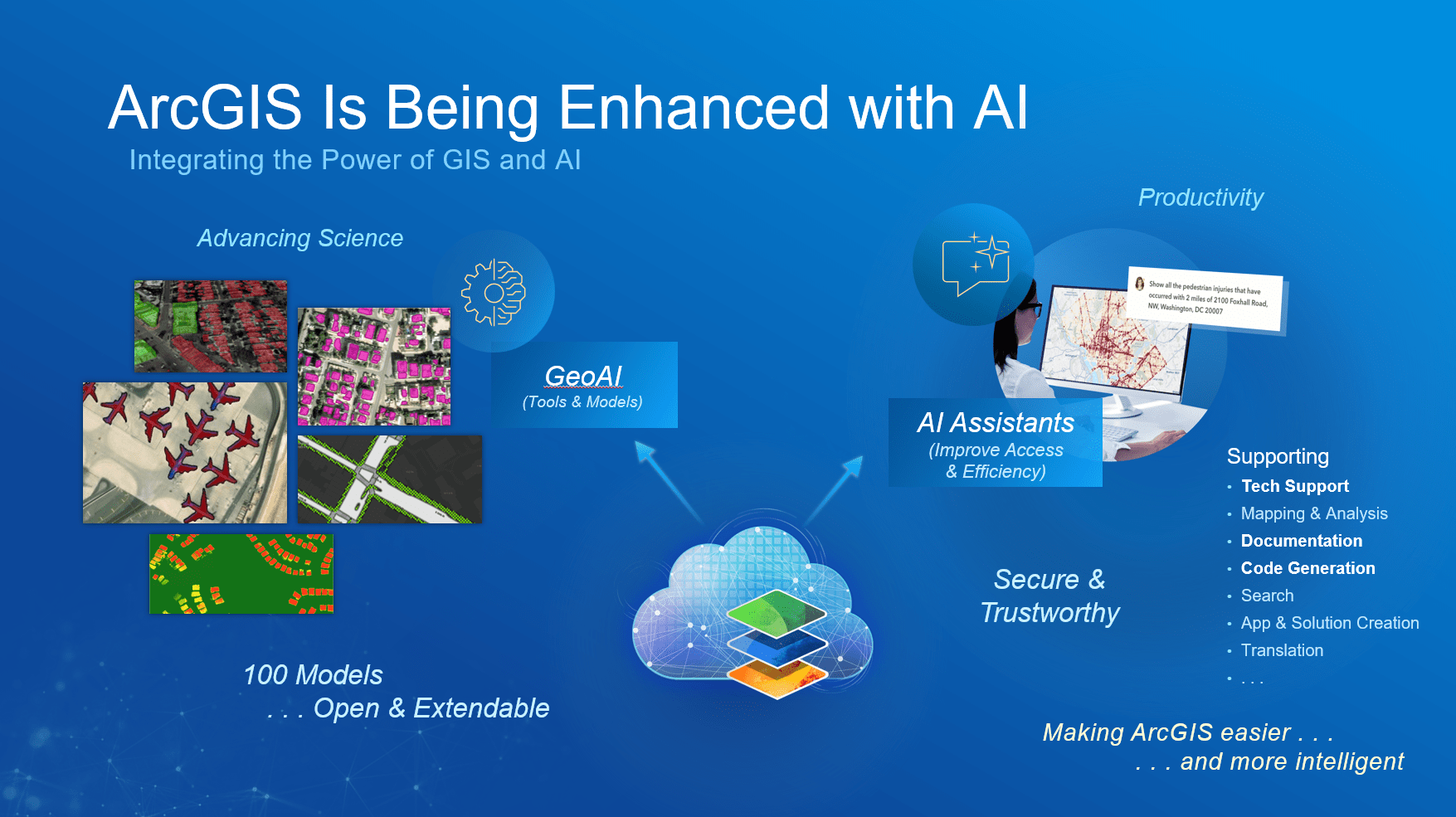
Secure and trustworthy GeoAI is available throughout the ArcGIS system, from AI assistants in your ArcGIS Enterprise or ArcGIS Online web portal to GeoAI tools and models in your desktop ArcGIS Pro, to help advance your productivity and science of where.
Data extraction
GeoAI in ArcGIS integrates artificial intelligence with GIS to perform computer vision tasks that extract meaningful features from imagery and unstructured data using machine learning and deep learning techniques. The process begins with preparing high-resolution imagery, such as satellite, aerial or drone data, and performing preprocessing steps like clipping, projection and enhancement. ArcGIS offers several tools for this purpose, including ArcGIS Pro with the Image Analyst extension and the ArcGIS API for Python. In ArcGIS Pro, you can use the Image Classification Wizard for pixel-based classification or deep learning tools like Train Deep Learning Model and Detect Objects Using Deep Learning to identify and extract objects such as buildings or roads from imagery, 3D and video. Alternatively, the arcgis.learn module in ArcGIS API for Python provides a flexible environment for training and applying models. You can either train your own models using labelled data or leverage Pretrained Deep Learning Models, many available in the ArcGIS Living Atlas of the World for common tasks like building footprint extraction or land cover classification. Once objects are detected, they can be converted into vector features for further analysis and refinement.
If you work with unstructured data, ArcGIS Knowledge and the ArcGIS API for Python enable natural language processing to extract location-based entities from text sources such as social media or reports, which can then be geocoded and mapped. In ArcGIS Pro, the GeoAI toolbox automates text classification, text transformation and entity extraction.
The combination of tools and techniques allows you to efficiently transform raw imagery and text into actionable GIS-ready features. You can get started on this way of using of GeoAI through the instructor-led course Imagery Analysis in ArcGIS Pro.
Spatial analysis
GeoAI in ArcGIS combines artificial intelligence with GIS to enable advanced spatial analysis by automating workflows, predicting future scenarios and optimizing decisions (more details available in the Rise of Geospatial AI e-book).
- Automation takes advantage of geospatial AI to quickly process complex location data, evaluate multiple scenarios and recommend optimal solutions. Enterprise GIS lays the foundation for AI-powered digital twins that automate analysis and forecasting for mission-critical decisions.
- Prediction leverages machine learning and deep learning to rapidly identify patterns, correlations and trends on the horizon. This insight enables them to take smarter, more informed action and work more efficiently.
- Optimization fuses the full picture of organizational data with GeoAI to improve decision-making and maximize efficiency and performance across operations. Examples include optimizing delivery routes, allocating resources efficiently or determining the most suitable locations for new infrastructure. The potential is there to move from sensing and then responding to predicting and intervening proactively.
ArcGIS provides a comprehensive ecosystem for implementing these approaches, including ArcGIS Pro geoprocessing tools (e.g. Multivariate Clustering, Spatially Constrained Multivariate Clustering, Density-Based Clustering, Build Balanced Zones, Interpolation, Regression, Classification, Causal Inference Analysis, Time Series Forecasting), extensions (e.g. Image Analyst, Spatial Analyst, Geostatistical Analyst), pretrained models and Python-based automation through the ArcGIS API for Python. By integrating automation, prediction and optimization, GeoAI transforms raw data into actionable intelligence, enabling organizations to make smarter, faster and more informed spatial decisions. You can get started on this way of using of GeoAI through the instructor-led course Spatial Data Science: Advance Your Analytics.
360 degrees of GeoAI in ArcGIS
GeoAI can be applied in so many interesting and invaluable ways to your work, so it’s a great time to jump on in with the help of this web app full of plentiful resources: 360 degrees of GeoAI in ArcGIS. And if you have an impending GeoAI initiative for your organization then you might also be interested in a workshop to help you with Preparing for Change.
More courses for you to explore
- Available starting in Q2 2026: Spatial Data Science: Advance Your Analytics
- Python scripting courses that support a lot of GeoAI workflows:
To stay informed about all the latest training opportunities at Esri Canada, visit Esri Canada’s Communication Preference Centre and select the “Training” checkbox to get a monthly roundup straight to your inbox.