ArcGIS Pro: Which map series is right for you?
Tired of creating the same map layout over and over again? ArcGIS Pro Map Series can automatically generate a collection of maps from a single layout, saving you time while maintaining a consistent design. Discover the differences between Bookmark, Spatial and Thematic Map Series and when to use each one.
Introduction
Have you ever needed to create a map book with multiple pages only to realize halfway through that each page has a nearly identical layout? Creating multiple layouts from scratch is a time-consuming task that could take hours. Luckily, ArcGIS Pro has a more efficient solution called Map Series.
What is a Map Series?
A Map Series in ArcGIS Pro allows you to easily create a uniform map book based on a single layout that you create. Each page can highlight a specific map extent or feature which maintaining a consistent design. You can also make use of dynamic text so you will have a set of unique map pages that all have the same structure. Rather than creating 30 different layouts, you can create a single layout and with the click of a button have it duplicated for all the features you want to highlight.
ArcGIS Pro currently offers three types of Map Series: Bookmark, Spatial and Thematic. In this blog we will explore each option and how to determine which best fits your workflow.
Bookmark Map Series
In a Bookmark Map Series, each page within the series will highlight a different bookmark. Before you create the map series you will first need to create your bookmarks. Your map series will have the same number of pages as there are bookmarks that you have created.
A Bookmark Map Series is ideal when the areas you want to highlight do not follow a consistent geographic pattern. It is also a great option if the features that you want to highlight are best shown at different extents as you can customize each extent when creating your bookmarks.
Example use case: You are looking to create maps for multiple construction project located throughout a city. By creating a bookmark for each project, you can customize the exact location and extent while keeping a uniform layout for each map.
This GeoSnap will show you how to create a Bookmark Map Series in ArcGIS Pro:
Spatial Map Series
A Spatial Map Series uses an index layer to define the extent and content of each map page. An index layer can be created from a point, line or polygon feature layer and is used to set the page extent. There are two types of index layers that can be used in a Spatial Map Series:
-
Feature Index Layer – each feature within your feature layer will have its own page
Example use case: If you have a map of all the provinces and territories in Canada, each province/ territory will have its own individual page in the map series.
-
Grid Index Layer – each cell within your grid will have its own page. When configuring the grid index layer, you can define the number of rows and columns you want the grid to have. This allows you to control the number of grid cells which in turn allows you to control the number of pages your map series will have.
Example use case: If you have a map of a provincial park, using a grid index layer allows you to evenly divide the park into smaller sections making it easier for end users to view detailed map content.
A Spatial Map Series will be your best option when you want your map series to be based on geographic features or to highlight a large area of coverage. Once you have your index layer created you can even use its attributes to drive dynamic text like page numbers, titles and sorting sequences.
This GeoSnap will show you how to create a spatial map series in ArcGIS Pro:
Thematic Map Series
The final type of Map Series is the Thematic Map Series where each page will show a different layer visible and hide the rest of your layers. The extent will remain the same over all the pages in the map series. The rotation between different layers being visible on each page is made possible by iterating through the sublayers of a radio group layer. A Radio Group layer is a type of group layer that restricts visibility to only one sublayer withing it at a time. All layers outside of the radio group will be visible on all pages within the map series.
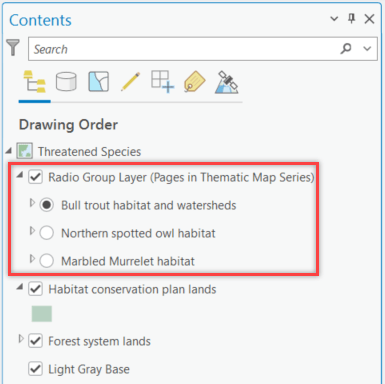
Example of a Radio Group layer in ArcGIS Pro. A Thematic Map Series cycles through the sublayers within the Radio Group layer, displaying one thematic layer per page while maintaining the same map extent. Any layers outside of the Radio Group layer remain visible across all pages in the map series.
The Thematic Map Series is perfect for when you have multiple different layers that you would like to highlight one at a time in the same location. By keeping the map extent, the same across all the pages, your end users will be able to compare the different layers you are highlighting easily.
Example use case: You are creating a transportation report for your city. You can have layers showing roads, transit routes, cycling infrastructure and population density all on their own pages while still maintaining the same map extent.
This GeoSnap will show you how to make a Thematic Map Series in ArcGIS Pro:
Which Map Series should you choose?
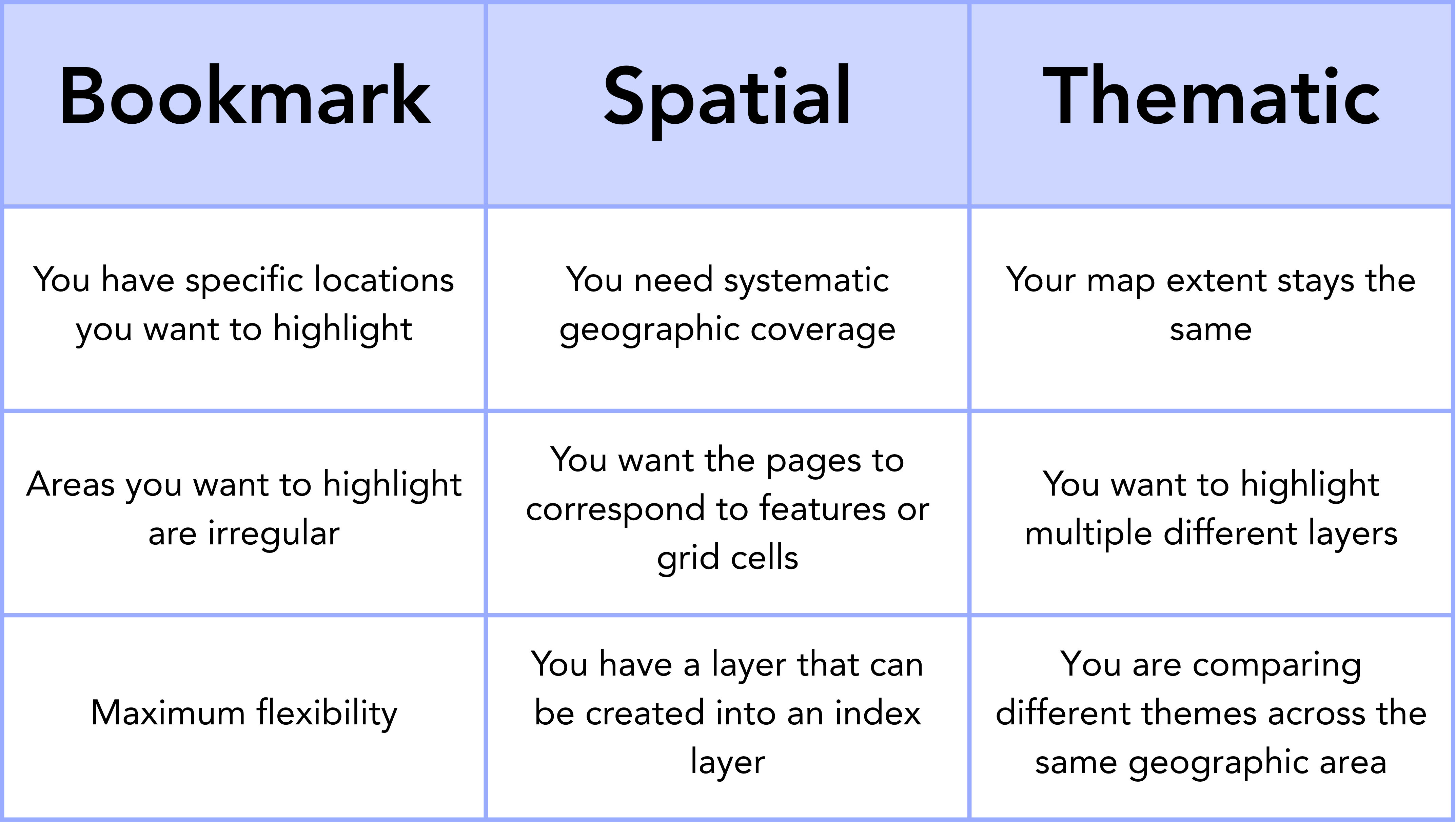
Reference guide for choosing between Bookmark, Spatial and Thematic Map Series in ArcGIS Pro based on your mapping requirements.
Conclusion
Utilizing a Map Series in ArcGIS Pro is a quick and easy way to create professional, uniform map books with the click of a button. Whether you choose a Bookmark, Spatial or Thematic Map Series, they each offer unique capabilities to meet your project needs. Picking the right Map Series for your project will help you spend less time creating layouts and more time telling the story behind your data.