Fill form to unlock content
Error - something went wrong!
Get the latest in geospatial strategy
Thank you!
The Geospatial Edge: Issue 17, Q3 2026
The Geospatial Edge is Esri Canada’s periodic newsletter for managers and professionals tasked with growing their organizations’ geospatial capabilities. In this issue, Matt Lewin discusses four AI agent engagement modes that can help you better understand how AI agents fit into your GIS workflows.
Most writing about AI agents gets technical fast. Orchestrators, sub-agents, ReAct loops, planner-executors, model context protocols. That vocabulary is useful if you're building an agent. It's less useful if you're just trying to think about their utility.
I've found it helpful to set the architecture aside and ask a different question: how do you interact with the agent? Specifically, who starts the exchange and who's waiting for the result? That turns out to sort agents into four reasonably clean categories, and the categories are easier to reason about than the architectures.
The sort is simple. An agent waits for a signal, then acts on it. The signal comes from one of two places: you or the world. And the action happens at one of two times, while you wait or while you're doing something else. Put another way, the agent is either human-initiated or event-initiated, and it acts either synchronously or asynchronously. Combined, we get four "engagement modes" that encapsulate most types of agents.
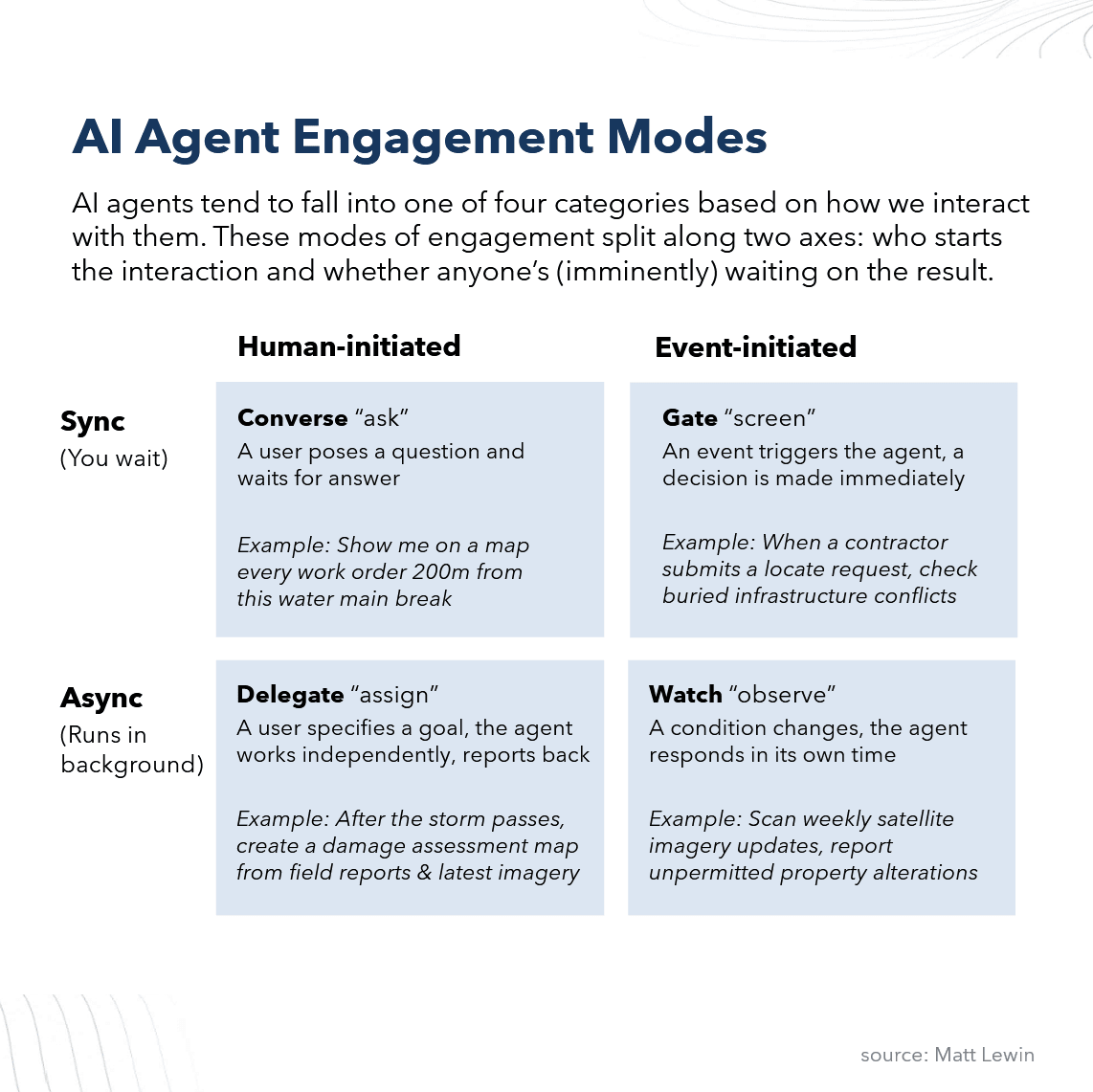
AI agent engagement modes
Two signals, two timings, four kinds of agents. Not four architectures. Four ways an agent fits into your work.
Converse
You ask a question -> the agent answers -> you take it from there.
This is the mode everyone's familiar with. It's the chat box, the prompt bar or the assistant pane. Essentially, the conversation is the interface, and you're in it the whole time. Whether the agent uses a single model or coordinates ten models under the hood doesn't matter at this level. What matters is that you're driving and the answer (in the form of text, video, images, code, maps, etc.) comes back fast (ideally).
It's also the mode where you stay firmly in the loop on every decision. The agent proposes something, and you take it or leave it. Nothing leaves the room without your nod. I'd say it's the most intuitive type of agent.
Example: An asset supervisor investigating a water main issue asks, "Show me on a map every work order within 200m of a recent water main break." A map comes back while they wait, then the supervisor follows up. Basically a conversation that ends in a useful information product the supervisor can use.
When to use it: When the question is exploratory, the answer needs to come back quickly, and a human is going to act on it directly. Good for one-off questions or situations where the value is as much in the back-and-forth as the deliverable.
Key design considerations: The interface is doing more work than it looks. A good Converse agent makes its reasoning visible enough that the user can tell when to trust it and when to push back. It should surface the sources behind an answer and handle follow-up gracefully. And it should fail honestly. A Converse agent that says "I don't know" is more useful than one that always has an answer.
Delegate
You give the agent a job (not a question) -> walk away -> pick up the result later.
This mode operates differently from the "Converse" style agent, in that what you hand over isn't so much a query as an entire task that could have taken someone a while to complete. The agent breaks down the task into sub-tasks and then executes the multi-step work it takes. You don't necessarily know or need to know whether it's calling sub-tools, planning then executing or running an autonomous loop. You need to know that you've handed over the work and you'll see what comes back.
Example: "Produce the suitability analysis for every candidate hospital site, including population coverage, drive-time gaps, available land and flood exclusion, and have it ready by tomorrow." In the morning, you don't just get a map to look at but methodical analysis and a set of recommendations.
When to use it: When the work is well-defined, the output can be reviewed before it's used, and the time saved is worth the trouble of properly scoping the job. Best for production tasks with a clear standard for "done."
Key design considerations: Because you weren't there while the work happened, the agent has to leave a trail. A good Delegate agent shows its work: what it tried, what it ruled out, what assumptions it made and where it's least confident. It should scope itself back when the brief is unclear rather than guessing. It should also produce output that's structured for review, not just for reading, so the person checking it can verify the parts that matter without redoing the whole thing.
Gate
An event (not a human) triggers the agent -> the agent acts and responds immediately.
I named this mode "Gate", but it could also be called "Intercept", since the defining feature is that the agent responds to an event rather than a human interaction. This could include:
- time-based events such as a scheduled interval passing or a recurring open/close window (e.g. business hours)
- data changes such as a new record created in a database (e.g. a ticket is opened)
- threshold crossing such as a temperature or an error rate, or a statistical anomaly
- external signals such as an API call, a social media update or another agent call
When the event triggers the agent, the agent goes to work synchronously. This means the agent is the next step in a defined workflow. The workflow can't continue until the agent acts. This is the key way a Gate agent differs from a Watch agent, which essentially observes and records its observations (next section). For instance:
- A submission can't complete until the compliance check returns
- A dispatch can't go out until a unit is chosen
- A transaction can't clear until the fraud check passes
- A request can't route until it's been classified
Example: A municipal 311 service request is received. The agent routes the request directly to the appropriate department's work queue, assigns a priority and sends the resident an acknowledgement with an expected response time.
When to use it: When a decision has to be made on every event, in the moment and waiting for a human isn't an option. Best when the decision rules are well understood, and there's a clean path to escalate the ones that aren't.
Key design considerations: Every decision has to be defensible later, so the inputs logged and the reasoning auditable. The agent needs clear bounds on what it will decide on its own and what it kicks to a human. It likely needs a kill switch too because a Gate agent making bad decisions at scale is worse than no agent at all. And it needs a way to learn from the cases it gets wrong without those lessons quietly drifting the system in a direction nobody approved.
Watch
The agent listens and waits for a cue to act. It then acts in its own time.
The "Watch" mode is essentially a monitor pattern where the agent's defining quality is waiting. First, nobody asks it to run; an event in the data triggers it. Second, when it does act, no one is imminently waiting on the result in real time. It runs in the background and provides updates at intervals or when certain conditions arise, which a human or perhaps another agent checks in on it at prescribed intervals or ad hoc. The key difference from the Gate mode is that nothing is blocked or set to be triggered immediately when the agent makes its update.
This is an area where agents quietly outperform humans because they're being asked to do something humans are bad at: sustained attention.
Example: A new development application gets filed. The agent checks it against the overlays in the background, and where it touches a heritage zone, it drops a flag in the heritage team's queue. The team reviews flagged applications each morning. Nothing is waiting on the agent to finish, it just makes sure a rare but important event gets noticed.
When to use it: When something important happens rarely or unpredictably. Good for monitoring, exception detection and any situation where the issue is buried in a lot of noise.
Key design considerations: An effectively designed Watch agent needs to consider several factors: the threshold (i.e. what counts as worth flagging), the owner (i.e., who's notified and how), failure notification (i.e. because it sits in the background, how will you know if it's stopped working?) and memory (i.e. has the situation already been handled). Essentially, a Watch agent is 20% detection, 80% is the right person notified, do they act on the information, and do they trust the agent is still running.
In closing
Most of the conversation about AI agents is still happening at the level of frameworks and architecture. That conversation is necessary, but it isn't the only one worth having. I've found that thinking about agents in terms of how you interact with them is more useful. It puts the user and the business at the centre of the question, especially when it comes to connecting them to a real business process or creating an agent that delivers real business value.
The architecture remains where it belongs: as a means to an end, chosen after the upstream questions have been answered.
Let’s talk
Are you exploring the potential of AI and AI agents for your business? Are you looking to evolve your skills and understanding? Send me an email or connect with me-on LinkedIn. I’d like to hear from you!
All the best,
Matt
The Geospatial Edge is a periodic newsletter about geospatial strategy and location intelligence by Esri Canada’s director of management consulting, Matt Lewin. This blog post is a copy of the issue that was sent to subscribers in July 2026. If you want to receive The Geospatial Edge right to your inbox along with related messages from Esri Canada, visit our Communication Preference Centre and select “GIS Strategy” as an area of interest.